2026-04-12
1. About utxt
utxt is a static site generator whose syntax is greatly inspired by TEX, i.e.: \function{argument1}{argument2}, instead of, for example: (:elisp arg1 arg2) or c_function(arg1, arg2).
The language has a bunch of built-in functions, like:
\section{text}        for generating numbered, clickable sections
\color{text}{color}   for colored text
\wavy {text}          for wavy text

\counter{name} -> num    for auto-incrementing counters
\list-add{list}{item}    for lists that can be later displayed
\list-show{list}{func}   for actually displaying the list (by line)

\decl{name}{body}{..args}   for declaring functions
\set {name}{value}          for making variables

\time-travel         for travelling through time
\table-of-contents   for taking sections and generating the table of contents
\section{text}      for generating numbered, clickable sections
\color{text}{color} for colored text
\wavy {text}        for wavy text

\counter{name} -> num  for auto-incrementing counters
\list-add{list}{item}  for lists that can be later displayed
\list-show{list}{func} and actually displaying (here each line of the list)

\decl{name}{body}{..args} for declaring functions
\set {name}{value}        for making variables

\time-travel       for travelling through time
\table-of-contents for taking sections and generating the table of contents
As well as only 5 syntactical symbols: 1 1 A fun quirk about this system is that it fully allows function names, like \decl{TEX} and \𝕄𝕐⸻𝔽𝕌ℕℂ𝕋𝕀𝕆ℕ.
\ | start of function (functions are functions, variables and constants) |
{ | start of argument |
} | end of argument |
``` | literal text until the next ``` |
▯ | (i.e. ASCII whitespace / char 0x20) is an alternative end of function |
2. Why I Made utxt
First and foremost, as with all of my projects, for fun.
Secondly, from what I have seen most static site generators are Yet Another Markdown To HTML Converter(s).
And, while Markdown is good for documentation, I find myself rarely using its symbols2
2 Plus, I have a paper cut over # and * when writing Lithuanian text in Markdown (and Typst). in blogs and other less technical text.
What I want instead is a simple macro syntax, that lets the writer separate the more complex HTML constructs from their freeform text.
Thirdly, I dislike how table syntax works in... everything. Perhaps it's because tables are just a horrible way to structure entire sentences, all teachers of mine! But they tend to go off screen, which then makes text wrapping not viable and horizontal scrolling starts being necessary (which sucks)... This can be mitigated in tools like Typst, but data normally still needs to be filled out by row, instead of: by column...
Although, I have not yet implemented tables in utxt, so perhaps transposing them does not help or introduces bigger problems...
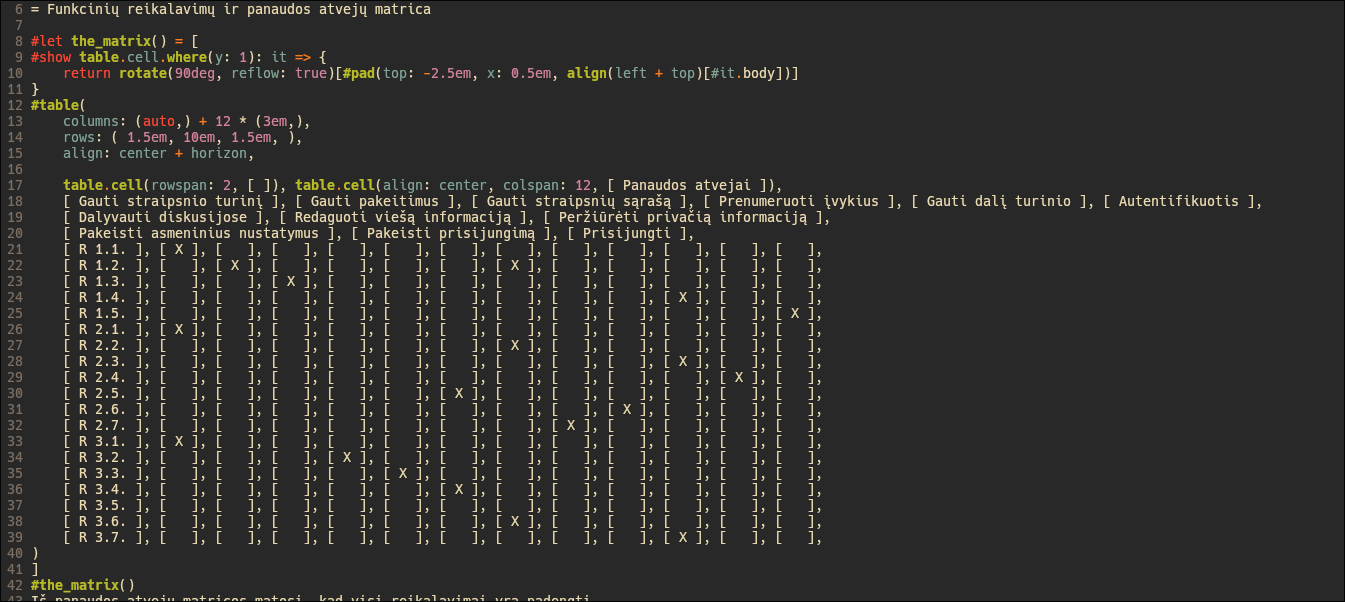
Furthermore, I want to have my own custom lexical analyzers for code highlighting. I use my own custom languages and pseudolanguages often enough, to where working with Tree-sitter or, maybe, modify highlight.js (even though, I really don't want to do at runtime (with JavaScript) what I can instead do at compile time) feels like it would be harder than making my own DIY Lexer interface... And also, it should result in more consistent highlighting.
Finally, I don't think I will be able to find another site generator that just stole Typst's symbols and that is very sad, because I love everything about them!
3. Inner workings
To start, utxt is implemented over 4 files, totalling only 2.6k LoC:
main.odin         --  defines data structures and does setup
util.odin         --  defines utility and convenience functions
viewer.odin       --  implements the graphical documentation viewer
interpreter.odin  --  tokenizes, parses and interprets each utxt file
main         --  data structures and setup
util         --  utility and convenience functions
viewer       --  graphical documentation viewer
interpreter  --  tokenizer, parser and interpreter
3.1. The Interpreter
Each utxt file is processed over 4 main stages:
====== raw text ======
A utxt file.
With the \function{arg1}{arg2}.

====== tokenized ======
A utxt file. | \n |
With the     | \  | function |
{ | arg1 | } | { | arg2 | }

====== parsed ======        |   ====== interpreted ======
root:                       |   text builder
    text ("A utxt file.")   |     ⤶ get_text("A utxt file.")
    text ("\n")             |     ⤶ get_text("\n")
    text ("With the ")      |     ⤶ get_text("With the ")
    func ("function"):      |     ⤶ eval("function", "arg1", "arg2")
        argument:           |       ⤶ eval("arg1")
            text ("arg1")   |         ⤶ get_text("arg1")
        argument:           |       ⤶ eval("arg2")
            text ("arg2")   |         ⤶ get_text("arg2")
====== raw text ======
A utxt file.
With the \function{arg1}{arg2}.

====== tokenized ======
A utxt file. | \n |
With the     | \  | function |
{ | arg1 | } | { | arg2 | }

====== parsed ======        |   ====== interpreted ======
root:                       |   text builder
    text ("A utxt file.")   |     ⤶get_text("A utxt file.")
    text ("\n")             |     ⤶get_text("\n")
    text ("With the ")      |     ⤶get_text("With the ")
    func ("function"):      |     ⤶eval("function", "arg1", "arg2")
        argument:           |       ⤶eval("arg1")
            text ("arg1")   |         ⤶get_text("arg1")
        argument:           |       ⤶eval("arg2")
            text ("arg2")   |         ⤶get_text("arg2")
The tokenizer simply splits a single string into an array of string views3
3 A string view is just: { data, length }. This makes it possible to slice a string from the right without copying or destroying the current one. . Then the parser takes this array and generates the Abstract Syntax Tree:
struct Node {
    type   : enum  { Root, Text, Func, Arg },
    data   : union { token: int, text: string }, // pseudocode in Odin
    nodes  : [dynamic] ^Node,
    parent :           ^Node,
}
struct Node {
    type   : enum  { Root, Text, Func, Arg },
    data   : union { token: int, text: string }, // pseudocode in Odin
    nodes  : [dynamic] ^Node,
    parent :           ^Node,
}
And finally, the root node is passed into the eval :: proc(node: ^Node) -> string procedure, which recursively expands and combines all of the nodes until there is nothing left.
By getting function results, extracting text from Text nodes, concatenating everything inside Argument nodes and calling functions.
Functions, prior to this point, are actually ambiguous in this language, because the \identifier syntax can mean: user-defined function, built-in functions, variables and built-in symbol constants.
- 1. user's variables
- 2. user's functions
- 3. builtin functions
- 4. builtin constants
If either a built-in or user-declared function is called, the arguments that were passed to it get copied into a newly created "stack frame," which can then be accessed while the declared body is being evaluated. Everything is also type-checked.
- 1 A fun quirk about this system is that it fully allows function names, like \decl{TEX} and \𝕄𝕐⸻𝔽𝕌ℕℂ𝕋𝕀𝕆ℕ.
- 2 Plus, I have a paper cut over
#and*when writing Lithuanian text in Markdown (and Typst). - 3 A string view is just:
{ data, length }. This makes it possible to slice a string from the right without copying or destroying the current one.